2021년 11월 21일 일요일

WPF DataBinding, INotifyPropertyChanged 인터페이스를 이용한 데이터 바인딩 예제, WPF교육학원


WPF DataBinding, INotifyPropertyChanged 인터페이스를 이용한 데이터 바인딩 예제, WPF교육학원


http://ojc.asia/bbs/board.php?bo_table=WPF&wr_id=175 


WPF DataBinding, INotifyPropertyChanged 인터페이스를 이용한 데이터 바인딩 예제

WPF DataBinding, INotifyPropertyChanged 인터페이스를 이용한 데이터 바인딩 예제INotifyPropertyChanged 인터페이스는 속성 값이 변경되면 클라이언트에 알리는 데 사용된다. INotifyPropertyChanged 인터페이스에는

ojc.asia


https://www.youtube.com/watch?v=Orwyaq51MXQ&list=PLxU-iZCqT52Cmj47aKB1T-SxI33YL7rYS&index=14&t=1182s 

  • INotifyPropertyChanged 인터페이스는 속성 값이 변경되면 클라이언트에 알리는 데 사용된다. INotifyPropertyChanged 인터페이스에는 PropertyChanged라는 이벤트가 포함되어 있는데 ViewModel / Model 개체의 속성이 변경되면 PropertyChanged 이벤트를 발생시켜 WPF 바인딩 시스템에 새 값을 알려준다. 
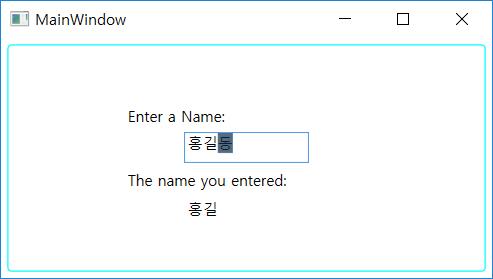


  • INotifyTest 라는 이름으로 WPF 프로젝트 생성
  • Person.cs

using System.ComponentModel;

namespace INotifyTest{

    public class Person : INotifyPropertyChanged    {

        private string name;


        // Declare the event 

        public event PropertyChangedEventHandler PropertyChanged;


        public Person() { }


        public Person(string value) { this.name = value; }

        public string PersonName

        {

            get { return name; }

            set

            {

                name = value;

                // Call OnPropertyChanged whenever the property is updated 

                OnPropertyChanged("PersonName");

            }

        }

        // Create the OnPropertyChanged method to raise the event 

        protected void OnPropertyChanged(string name)

        {

            PropertyChanged?.Invoke(this, new PropertyChangedEventArgs(name));

        }

    }

}


  • MainWindow.xaml

<Window x:Class="INotifyTest.MainWindow"

        xmlns="http://schemas.microsoft.com/winfx/2006/xaml/presentation"

        xmlns:x="http://schemas.microsoft.com/winfx/2006/xaml"

        xmlns:d="http://schemas.microsoft.com/expression/blend/2008"

        xmlns:mc="http://schemas.openxmlformats.org/markup-compatibility/2006"

        xmlns:local="clr-namespace:INotifyTest"

        xmlns:src="clr-namespace:INotifyTest"

        mc:Ignorable="d"

        Title="MainWindow" Height="350" Width="525">

    <!--<SnippetBindingSource>-->

    <Window.Resources>

        <src:Person x:Key="myDataSource" PersonName="홍길동"/>

        <!--</SnippetInstantiation>-->

        <Style TargetType="{x:Type Label}">

            <Setter Property="DockPanel.Dock" Value="Top"/>

            <Setter Property="FontSize" Value="12"/>

        </Style>

        <Style TargetType="{x:Type TextBox}">

            <Setter Property="Width" Value="100"/>

            <Setter Property="Height" Value="25"/>

            <Setter Property="DockPanel.Dock" Value="Top"/>

        </Style>

        <Style TargetType="{x:Type TextBlock}">

            <Setter Property="Width" Value="100"/>

            <Setter Property="Height" Value="25"/>

            <Setter Property="DockPanel.Dock" Value="Top"/>

            <Setter Property="Padding" Value="3"/>

        </Style>

        <!--<Snippet2>-->

    </Window.Resources>

    <!--</Snippet2>-->

    <Border Margin="5" BorderBrush="Aqua" BorderThickness="1" Padding="8" CornerRadius="3">

        <DockPanel Width="200" Height="100" Margin="35">

            <!-- <Snippet1> -->

            <Label>Enter a Name:</Label>

            <TextBox>

                <TextBox.Text>

                    <Binding Source="{StaticResource myDataSource}" Path="PersonName" UpdateSourceTrigger="PropertyChanged"/>

                </TextBox.Text>

            </TextBox>

            <!-- </Snippet1> -->

            <!--</SnippetBindingSource>-->

            <Label>The name you entered:</Label>

            <!--<SnippetBDO1>-->

            <TextBlock Text="{Binding Source={StaticResource myDataSource}, Path=PersonName}"/>

            <!--</SnippetBDO1>-->

        </DockPanel>

    </Border>

    <!--<SnippetEndWindow>-->

</Window>


#MVVM#INotifyPropertyChanged #WPFCommand#WPFMVVM#MVVM이란#WPF강좌#WPF교육#WPF동영상#WPF학원

MVVM, INotifyPropertyChanged , WPFCommand, WPFMVVM, MVVM이란, WPF강좌, WPF교육, WPF동영상, WPF학원

WPF Command 패턴 HelloWorld, CanExecuteChanged , CanExecute, ICommand, WPf학원


WPF Command 패턴 HelloWorld, CanExecuteChanged , CanExecute, ICommand, WPf학원


http://ojc.asia/bbs/board.php?bo_table=WPF&wr_id=174 


WPF Command 패턴 HelloWorld, CanExecuteChanged , CanExecute, ICommand

WPF Command 패턴 HelloWorld, CanExecuteChanged , CanExecute, ICommand WPF의 명령(Command)은 ICommand 인터페이스를 구현하여 만들며 ICommand는 Execute 및 CanExecute라는 두 가지 메서드와 CanExecuteChanged 이벤트를 제공한

ojc.asia


https://www.youtube.com/watch?v=Ycb2Tg56l-M&list=PLxU-iZCqT52Cmj47aKB1T-SxI33YL7rYS&index=17&t=3s 

https://www.youtube.com/watch?v=5OEOPCHKR3Q&list=PLxU-iZCqT52Cmj47aKB1T-SxI33YL7rYS&index=18 

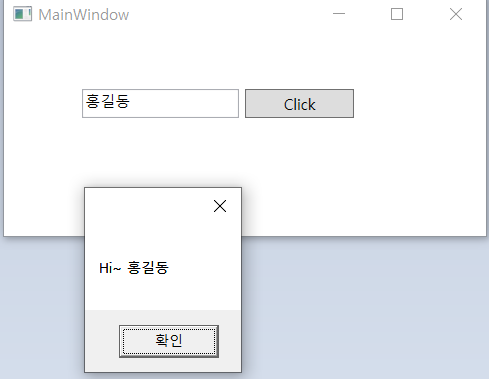
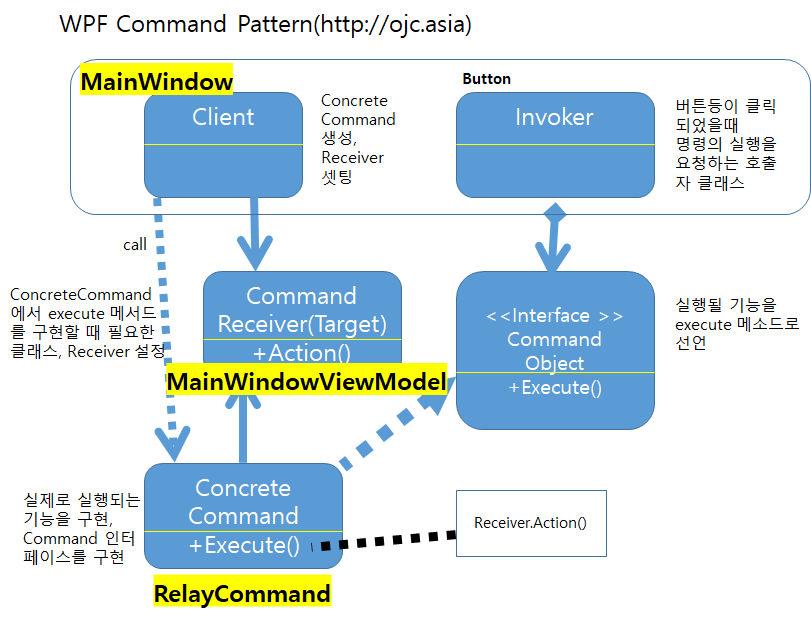
  • WPF의 명령(Command)은 ICommand 인터페이스를 구현하여 만들며 ICommand는 Execute 및 CanExecute라는 두 가지 메서드와 CanExecuteChanged 이벤트를 제공한다. 
  • Execute 메서드는 실제 처리해야 하는 작업을 기술하고 CanExecute 메소드에서는 Execute 메소드의 코드를 실행할지 여부를 결정하는 코드를 기술한다. CanExecute가 false를 리턴하면 Execute 메소드는 호출되지 않는다.
  • 즉 CanExecute 메소드는 명령을 사용 가능하게 하거나 사용 불가능하게 할 때 사용되며 명령을 사용할 수 있는지 여부를 확인하기 위해 WPF에 의해 호출된다. 이 메소드는 키보드 GET포커스, LOST포커스, 마우스 업 등과 같은 UI 상호 작용 중에 대부분 발생한다. 
  • CanExecute 메소드가 호출되어 CanExecute의 상태가 변경되면 CanExecuteChanged 이벤트가 발생해야 하며,  WPF는 CanExecute를 호출하고 Command에 연결된 컨트롤의 상태를 변경한다.


  • 1. View(MainWindow.xaml)

<Window x:Class="MVVMTest.MainWindow"

        xmlns="http://schemas.microsoft.com/winfx/2006/xaml/presentation"

        xmlns:x="http://schemas.microsoft.com/winfx/2006/xaml"

        xmlns:d="http://schemas.microsoft.com/expression/blend/2008"

        xmlns:mc="http://schemas.openxmlformats.org/markup-compatibility/2006"

        xmlns:local="clr-namespace:MVVMTest"

        mc:Ignorable="d"

        Title="MainWindow" Height="200" Width="400">

    <Window.DataContext>

        <local:MainWindowViewModel/>

    </Window.DataContext>

    <Grid>

        <TextBox x:Name="textBox" HorizontalAlignment="Left" Height="23" Margin="62,45,0,0" TextWrapping="Wrap"

                 Text="" VerticalAlignment="Top" Width="126"/>

        <Button Content="Click" 

                Height="23" 

                HorizontalAlignment="Left" 

                Margin="193,45,0,0" 

                Name="btnClick" 

                VerticalAlignment="Top" 

                Width="87"

                Command="{Binding ButtonCommand}" 

                CommandParameter="{Binding Text, ElementName=textBox}" />    

</Grid>

</Window>


  • 2. ViewModel(C# 클래스)- ViewModel에서 RelayCommand를 통해 메시지박스를 띄움

using System;

using System.Windows.Input;

using System.Windows;


namespace MVVMTest

{

    class MainWindowViewModel

    {

        private ICommand m_ButtonCommand;

        public ICommand ButtonCommand

        {

            get

            {

                return m_ButtonCommand;

            }

            set

            {

                m_ButtonCommand = value;

            }

        }


        public MainWindowViewModel()

        {

            //ButtonCommand = new RelayCommand(new Action<object>(ShowMessage));

            ButtonCommand = new RelayCommand(ShowMessage);


        }


        public void ShowMessage(object param)

        {

            MessageBox.Show("Hi~ " + param.ToString());

        }    }

}


  • ICommand를 상속받은 RelayCommand.cs

using System;

using System.Windows.Input;


namespace MVVMTest

{

    class RelayCommand : ICommand

    {

        private Action<object> _action;


        public RelayCommand(Action<object> action)

        {

            _action = action;

        }


        #region ICommand Members


        public bool CanExecute(object parameter)

        {

            return true;

        }


        public event EventHandler CanExecuteChanged;


        public void Execute(object parameter)

        {

_action(parameter);          

}

        #endregion

    }

}


Command vs Click Event


- Command는 Caller와 연결되어 있지 않으므로 동일한 Command가 메뉴 항목, 도구 모음 버튼, 키보드 등에서 호출 가능

- Command는 명령 상태에 따라 관련된 모든 UI 컨트롤을 활성화 / 비활성화 할 수 있도록 지원(실행 가능 또는 불가능)


#MVVM#COMMAND패턴#WPFCommand#WPFMVVM#MVVM이란#WPF강좌#WPF교육#WPF동영상#WPF학원

MVVM, Command패턴, WPFCommand, WPFMVVM, MVVM이란, WPF강좌, WPF교육, WPF동영상, WPF학원

(C#교육동영상)C# ADO.NET 실습 ODP.NET/ODAC 설치 오라클 함수 호출 실습, C#학원, WPF학원, 닷넷학원, 자바학원

  (C#교육동영상)C# ADO.NET 실습  ODP.NET/ODAC 설치  오라클 함수 호출 실습, C#학원, WPF학원, 닷넷학원, 자바학원 https://www.youtube.com/watch?v=qIPU85yAlzc&list=PLxU-i...